Friday, May 21, 2010

Multiply: Problem of posting

There's another problem in Multiply.big hug Bu Kusaini reported this problem:

"I was going to post something in the blog of my multiply but after I finished writing and clicked 'save & publish' it wouldn't work, there was a notice says 'javascript/CSS not allowed'. What should I do?"confused

You probably copied and pasted something from another website in your blog entry. What you copied from another website might have contained Javascript or CSS (Remember CSS? It's the "language" you use to edit the theme of your Multiply.) Multiply does not allow Javascript because it could contain virusdevil and might spread to other Multiply users.

To solve your problem, try this.

  • If you still have the draft of your post, copy and paste the content of the draft into Notepad.
  • To open Notepad, click Start > All Programs > Accessories > Notepad.
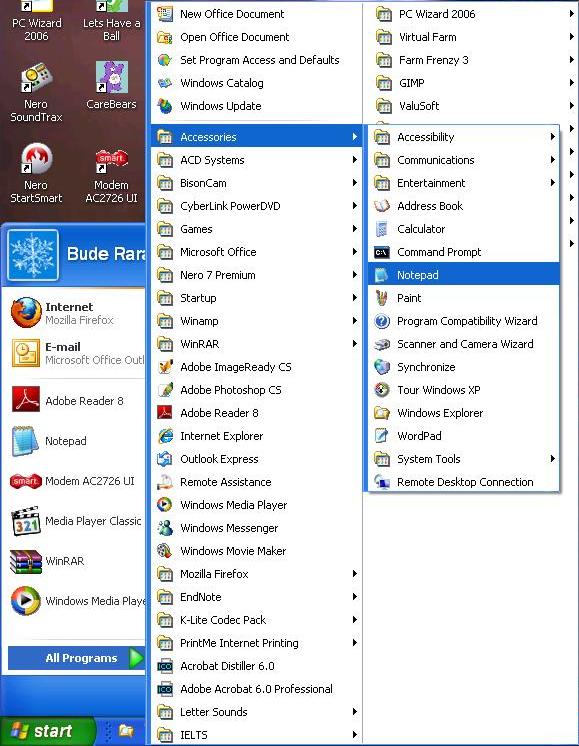
  • If you no longer have the draft, type what you are going to post in Notepad first.
  • Copy and paste it into Multiply.
  • Click Save & Publish.

Hopefully this could solve your problem.happy If not, please let me know by writing in the comment box below.

Thursday, May 20, 2010

Multiply: Problem in loggin in

Last week Pak Ali reported that he could not log in to his Multiply accountbroken heart, and just now Bu Kusaini reported the same problembroken heart. I have contacted the Customer Service of Multiply about this, and am still waiting for a reply from them. Hopefully this problem will be solved soon.

If this problem persists,at wits' end I think we should think of the other social networking sites for the final project. You could use Facebook, for example, or Friendster.

Wednesday, May 12, 2010

Messengers: Emoticons

We tried to use Yahoo Messenger in the teaching of speaking and grammar last time, and we also had 'written conversation' about YM. While chatting, we often used emoticons, such as and . Here is a snapshot of our chat last time.


Do you know that YM has hidden emoticons? Hidden emoticons are emoticons that you cannot find in your YM software but can be used by writing the appropriate codes.

Click here to see the emoticons.
Click here to see the hidden emoticons.

I hope the emoticons can make learning using YM more motivating for your students.

Tuesday, May 11, 2010

Let's Multiply: Problems and Theme

Yesterday some of you reported that you had created an account in Multiply but had difficulties in logging in. One of you even "lost" your account.

After tracing back the procedures in creating the account, we concluded that the problem might lie in the confirmation. After creating any accounts in the internet, you should check your email because you are sent a confirmation email. In the email message, you will find a link which you must click in order to confirm that it is really you who create the account. Could you please try to create an account again in Multiply? This time, don't forget to check your email and click the confirmation link there. Hopefully this will solve your problem.

ooOoo

You were also curious about changing the theme of Multiply. You could do it the easy way or the hard way. To do it the easy way, simply click:

Customize my site
Choose a theme
The theme you want (e.g. Sandskrit, Pagoda, etc.)

If you wish to put you own theme there, please click:
Customize my site
Custom CSS
Then you put your CSS there and click 'save'.

In order to customize the CSS (i.e. use your own pictures for the background, change the color of the rails, change the size of the fonts, etc.) you have to learn about it first. Don't worry, I'll try to give you the simplest explanation about how to costumize CSS (after we finish discussing blogs). In the meantime, you could find some excellent themes that Multiply users have created in:


There are hundreds of themes there. Pick the one you're interested in.

Saturday, April 17, 2010

Let's Multiply: Posting & Unhiding

I only have two friends in my Multiply, i.e. Bu Kussaini and Pak Slamet. I haven't seen other students' Multiply. Probably you haven't invited me to be a member of your Multiply because you have difficulties in posting something there. Therefore, I made Powerpoint slides which explain how to post in Multiply. Please download the slides here.

Bu Kussaini asked me how to make some features--such as Reviews and Links--appear in her site, because she couldn't see them anywhere in her Multiply. I have also made slides about this, and you could download them here.

I hope you could finish the assignment soon. Please don't hesitate to ask me questions if you have problems, I will be happy to help you. Good luck...

Friday, April 16, 2010

Let's Multiply: Social Networking Sites in TEFL

Social networking sites are sites that you can use to build social network through the internet.

In other words, you can use these sites to keep in touch with your family, students and friendshappy (...and enemiesdevil...hee hee) online. The most familiar example of social networking site is Facebook. Through Facebook, you can connect yourselves with anybody and do many interesting activities with them, such as showing off your photos and seeing others', give and receive comments on the Facebook's wall, chat with them online, etc.

There are lots of social networking sites available in the internet besides Facebook. Friendster used to be popular among people in Asia, including Indonesia, before they switched to Facebook. My Space is used among many people in Australia. Twitter is as popular as Facebook all over the world. You could read a comprehensive list of social networking site all over the world in Wikipedia.

I prefer using Multiply than Facebook, Friendster, or Twitter because the features of Multiply can be exploited for educational purposes. Please download my slides here and read them again to find out how you could use the blog, picture, video, review and link pages in Multiply to support the course (TEYL) I'm teaching at Unesa.


The assignment for the topic 'social networking sites' is: use Multiply to support a course you're teaching at school.

Create a multiply account in http://multiply.com.


Select a topic for your Multiply that you could share with your students, e.g. English, reading, grammar, etc.
Post some items in the blogs, photos, notes and external links.
Submit the address of your Multiply (e.g. gendolos.multiply.com) and the email address you use to open the account.
If possible, please invite me to be a member of your multiply site. Mine is htpp://shirtnjeans.multiply.com.

Good luck!party

Monday, April 12, 2010

Syllabus (revised)

Sorry there's a mistake in the dates that I wrote in the syllabus. Please download the revised syllabus here. I highlighted the correct date in pink.